What Belongs in Version Control?
Only Track Required Files
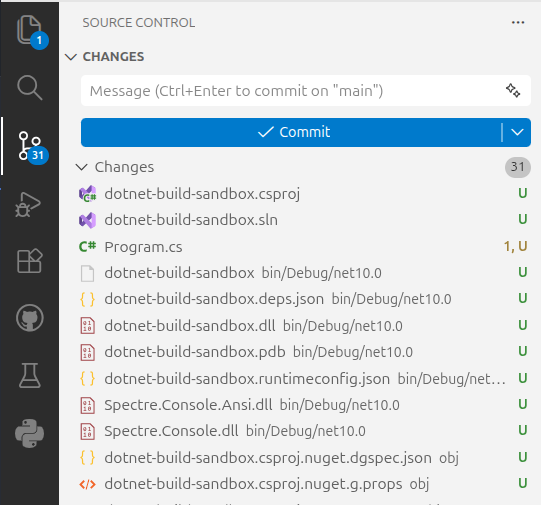
Only files that contain source code, meaningful configuration information, or content that is required for the application to run should be tracked in version control and included in the remote repository. Artifacts that can be rebuilt (e.g. bin and obj directories) should not be tracked. The source code contains all of the information needed to build the application.
Unless we remove these unneeded files, the repository will quickly become cluttered.
Prove it to Yourself
Try deleting the bin and obj directories then rebuilding the application to see them come back. This will help you trust that these can safely be discarded without losing information.
Creating a .gitignore File
Rather than manually deleting files that we don't want to include, we can create a .gitignore file in the root of the repository. This file contains a list of files and directories that should not be tracked in version control.
In .NET, the easiest way to create a .gitignore with proper defaults is to use the terminal command:
Our bin and obj directories are now ghosted in the explorer pane, and the source control pane shows only four pending changes - one for each file that we want to track.
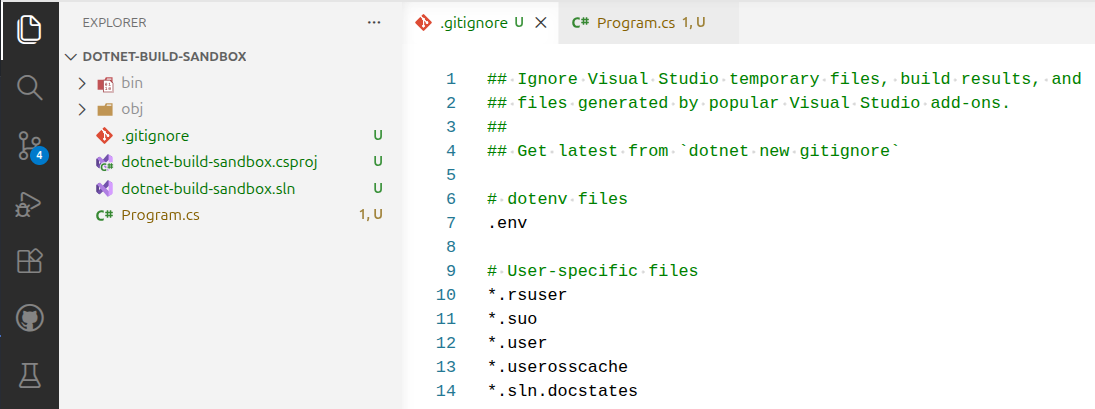
We can now commit changes and push them to the remote repository using the Source Control pane in Visual Studio Code. After you have committed and pushed (synced) your changes, you can see only the four files that we have tracked in the remote repository on GitHub.
Track your .gitignore file
Your .gitignore file does belong in version control. It contains valuable configuration information about what belongs with the application.
Commit Comments are Required
If you forget to type anything in the commit comment field, VS Code will open a file in the code editor window with the message "Please enter the commit message for your changes."
You don't have to use this file. This is the Git version control system reminding you that you forgot a commit message. You can simply close the file, type your message, and commit from the Source Control pane.