Integration Testing
What is Integration Testing?
Integration testing is the process of testing the interaction between two or more components of the application.
A component may refer to anything from a single class to a whole subsystem of the application (several modules), and there is no hard line between test types.
Integration Testing by Example
In the next few pages we will run a test that requires multiple components in the reference project work together. The components come from both the Web project (Razor Pages) and the Library project (the core Color Transform Library).
If you do not have experience debugging applications that make HTTP requests, this is a great opportunity to follow along and learn the process. Anyone working with web technologies will undoubtedly need to rig up a test server at some point.
Let's look at the web application again before we dig into the code. This shows the index page of the application, and a snippet of html from the rendered page. We will reference this screenshot later:
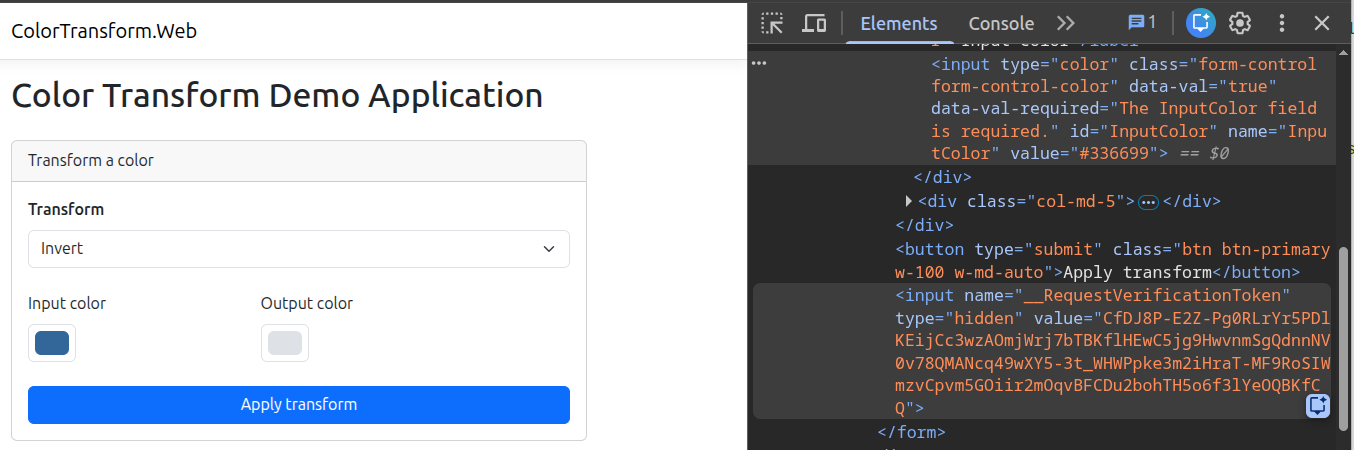
Viewing Rendered HTML
You can view the rendered HTML of a page in one of two ways:
- Right click on the page in the browser and select "View Source".
- Open the browser developer tools and view the "Elements" tab. This is usually bound to the
F12shortcut key, but you may also find this option in the browser menu.