End-to-End Testing
What is End-to-End Testing?
End-to-end testing is the process of testing the entire application from start to finish. Rather than focusing on an isolated use case. It is often used to test an entire user journey - a full sequence of actions that a user takes to achieve a goal.
End-to-End Testing by Example
The end-to-end test that we will look at is very similar to the integration test that we just ran. The main difference is that it more closely simulates how the application will run in a production environment.
The full code is available here.
Let's pick out a few snippets to show key differences:
Browser
The end-to-end test uses an actual browser to navigate the application. This type of browser, that does not render a window to the screen, is called a "headless" browser. Other than not being visible, it works exactly like a regular browser.
public async Task InitializeAsync()
{
    _playwright = await Playwright.CreateAsync();
    _browser = await _playwright.Chromium.LaunchAsync(new BrowserTypeLaunchOptions
    {
        ExecutablePath = "/usr/bin/chromium-browser",
        Headless = true
    });
    _context = await _browser.NewContextAsync();
    _page = await _context.NewPageAsync();
}
Web Application Process
The web application is not running in the same process as the test. It is started as a separate process, and the test communicates with it over HTTP. The two processes do not share a memory space, and work independently.
var startInfo = new ProcessStartInfo
{
    FileName = "dotnet",
    Arguments = $"run --project \"{projectPath}\" --urls {BaseUrl} --no-launch-profile",
    RedirectStandardOutput = true,
    RedirectStandardError = true,
    UseShellExecute = false,
};
startInfo.Environment["ASPNETCORE_ENVIRONMENT"] = "Testing";
Test Method
The test method asserts the same thing as the integration test, but it does it in a different way.
The HTTP request made by _page.GotoAsync actually hits the URL of the running application (http://127.0.0.1:5157) in the headless browser, just as if you opened a browser and navigated to the application.
[Fact]
public async Task user_applies_invert_and_sees_transformed_color_in_output_preview()
{
    // Navigate to the index page.
    await _page.GotoAsync($"{_webApp.BaseUrl}/");

    await _page.SelectOptionAsync("select[name='TransformType']", "invert");
    await _page.Locator("input[name='InputColor']").FillAsync("#336699");
    await _page.GetByRole(AriaRole.Button, new() { Name = "Apply transform" }).ClickAsync();

    var outputPreview = _page.Locator(".output-color-preview");
    var outputValue = await outputPreview.GetAttributeAsync("value");
    Assert.Equal("#cc9966", outputValue, StringComparer.OrdinalIgnoreCase);
}
It then finds the button on the page, searching by the HTML name attribute, and clicks it.
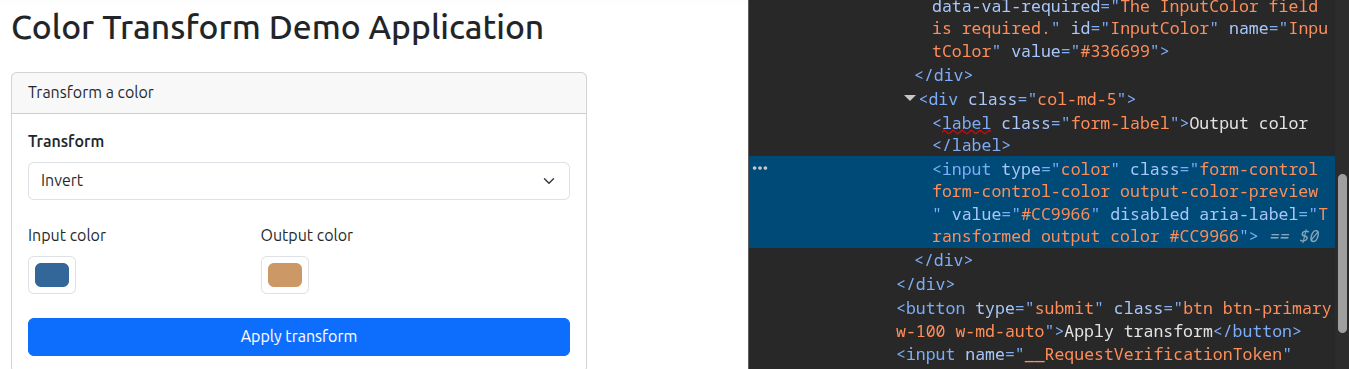
Finally, it searches for the preview element on the page by its CSS class name, gets the value of the value attribute, and asserts that it is the expected value. This color value is being read from the web page in the browser itself - not from an intercepted HTTP response.
This is what we saw from the previous screenshot of the application.
In the integration test there was no headless browser and no external input provided to a running instance of the application. We simply rigged up the components that were needed for the test.
In the end-to-end test we are running a full instance of the application and providing input to it; the process is simply automated rather than having a user do the steps manually.
Value of the End to End Tests
The main benefit of end-to-end testing is that it provides the most confidence that the application works as intended. Both unit and integration tests can pass, but only an end-to-end test automates a real-world scenario in full.
In the above example we modeled a user story where a user sets the dropdown menu to select the "invert" transform, enters the color "#336699", and clicks the "Apply transform" button. The end-to-end test confirms that the output preview displays the color "#cc9966" in the actual browser.
The downside of end-to-end testing is that it is often the most time and resource intensive test type to run. This has been greatly alleviated in recent years through elegant testing frameworks, tools like headless browsers, and containers that can quickly spin up a full environment, even with a realistic test data set.