Controlling the Test Environment
Why use Interfaces in Tests?
The use of interfaces is by no means specific to tests; however interfaces are used frequently in unit tests because they allow us to:
- Make test output predictable and deterministic by supplying controlled inputs
- Provide simplified versions of test dependencies that otherwise would be complex or costly to create
Faking a ColorTransform
The PaletteTransformerTests class provides an example of how we can use interfaces to our advantage when writing tests.
/*
    This class is here to decouple the actual transform from the test rather than
    tie it to any one implementation. For example: we could have used "InvertTransform"
    instead of "ColorTransformFake", but then these tests all count on the invert transform
    working correctly, and tests are not isolated to the system under test (PaletteTransformer).
*/
class ColorTransformFake : IColorTransform
{
    public RgbColor Apply(RgbColor color)
    {
        return new RgbColor(color.Red + 1, color.Green + 1, color.Blue + 1);
    }
}

[Fact]
public void palette_transformer_applies_transform_to_each_color()
{
    ColorPalette palette = new ColorPalette(
    [
        new RgbColor(0, 0, 0),
        new RgbColor(100, 101, 102),
    ],
    "My Palette");
    IColorTransform transform = new ColorTransformFake();
    PaletteTransformer transformer = new PaletteTransformer(transform);

    ColorPalette result = transformer.Transform(palette);

    Assert.Equal(2, result.Colors.Count);

    Assert.Equal(1, result.Colors[0].Red);
    Assert.Equal(1, result.Colors[0].Green);
    Assert.Equal(1, result.Colors[0].Blue);

    Assert.Equal(101, result.Colors[1].Red);
    Assert.Equal(102, result.Colors[1].Green);
    Assert.Equal(103, result.Colors[1].Blue);
}
Walking through the Test
In this test we want to make sure that each color that was provided to the PaletteTransformer was transformed correctly. Let's walk through the Arrange-Act-Assert pattern:
1. Arrange
First, the palette is created with two colors: one black and another with RGB values of 100, 101, and 102. It doesn't matter which colors were chosen; we are only using them to verify that the transform was applied correctly.
Next a ColorTransformFake instance is created. This is a fake implementation of the IColorTransform interface that simply adds 1 to the RGB values of the color.
Because the ColorTransformFake class implements the IColorTransform interface, it can be provided as the constructor argument for a PaletteTransformer instance, which we have done on the next line.
2. Act
The "Act" step is to call the Transform method on the PaletteTransformer instance, passing in the palette instance.
3. Assert
We make several assertions in this test, but they all relate to the behavior that we want to verify:
- The
Transformmethod returns aColorPaletteinstance with two colors. It didn't leave any out or add extras. - The first color has RGB values of 1, 1, 1. This is the result of the
ColorTransformFakeinstance adding 1 to the RGB values of the first color. - The second color has RGB values of 101, 102, 103. This is the result of the
ColorTransformFakeinstance adding 1 to the RGB values of the second color.
Stepping through the Test in VS Code
It can be especially challenging to figure out how all of the moving parts in a program fit together when you are first learning new concepts. The debugger is a valuable tool to help you understand what the program is doing.
Try setting a breakpoint in the test and using the "Step Into" command to step through the code. The source file is tests/ColorTransform.Tests/PaletteTransformerTests.cs:
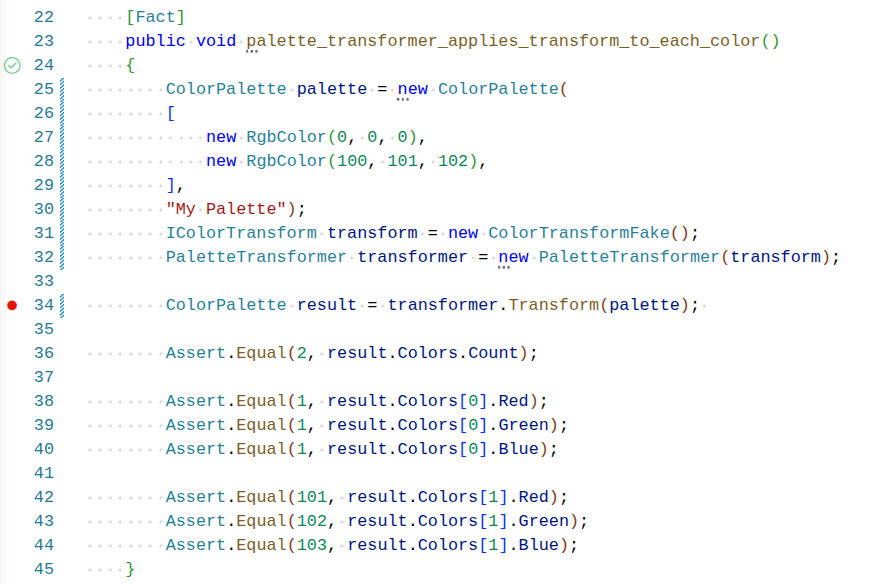
Then right click on the green checkmark next to the function name and select "Debug Test". From here you can use the "Step Into" command to step through the Transform method on ColorPalette and see how its copy of the ColorTransformFake instance is used to transform each of the colors that were provided.
Why Use a Fake Implementation?
Since we already have other implementations of the IColorTransform interface, for example GrayscaleTransform, why not just use one of these in the test?
If we were to use one of these implementations we would couple the test to the implementation of the transform itself. What would happen if we changed the details of how GrayscaleTransform works? We might, for example, change the formula for a lighter or darker shade of gray. This would break the test, because the test is expecting a different result.
The PaletteTransformer class is not supposed to know anything about which transform was provided to it. By using a fake implementation we are able to decouple the test from its dependencies, and isolate the behavior of the system under test (the PaletteTransformer class).
Using a fake implementation of a dependency gives us predictable results, and is another way to control the environment in which the test is run.